Trough-Dock Tilted Charging Station
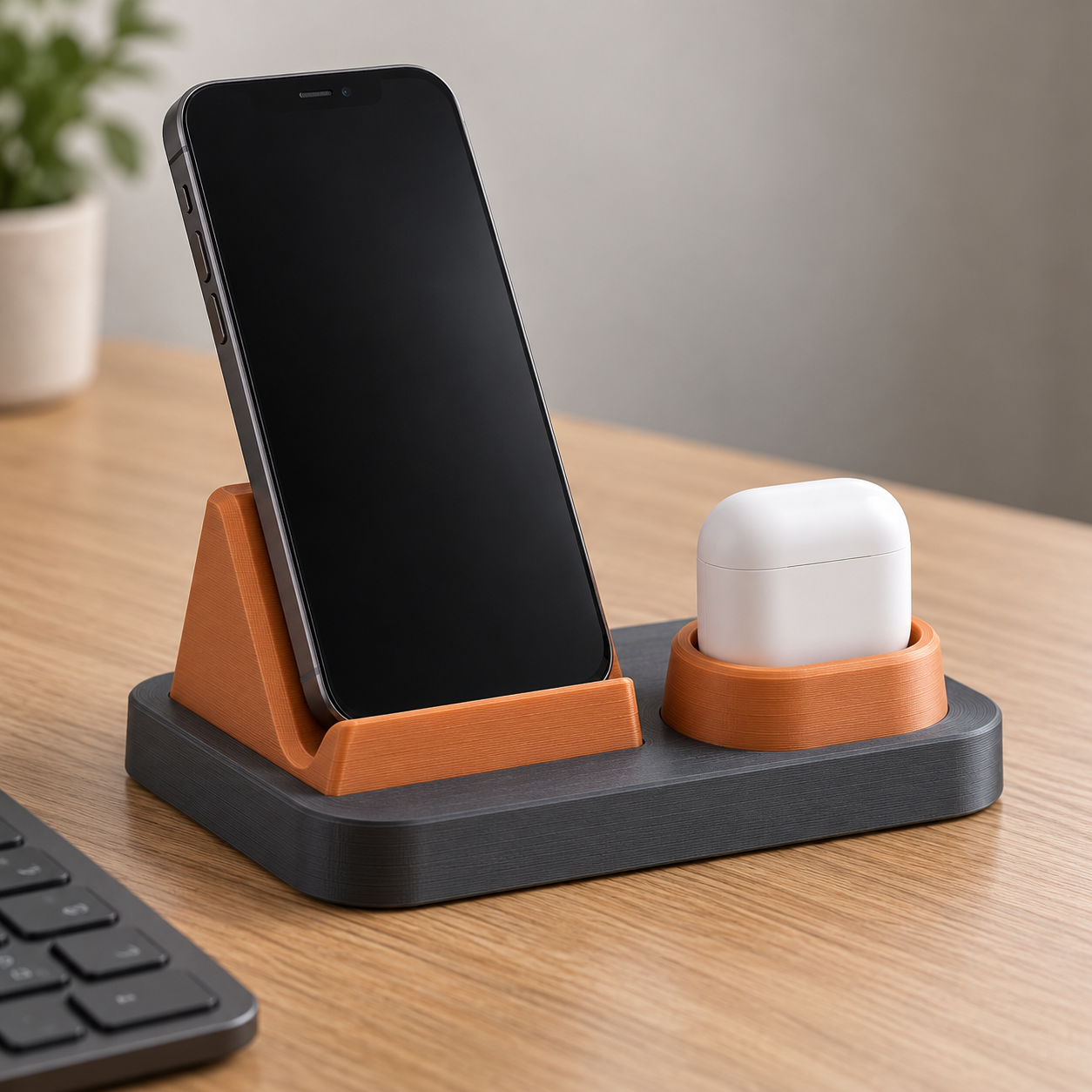
A two-device desk charging dock that tilts a phone to eye level for video calls and hides both charging cables in a snap-cover trough underneath.
Trough-Dock Tilted Charging Station
A two-device desk charging dock that tilts a phone to eye level for video calls and hides both charging cables in a snap-cover trough underneath.
Date: 2026-10-03 Category: Desk and Tech Modeling difficulty: Beginner Estimated print: ~8 h total · ~155 g PLA (estimate) Suggested price: $16–24 printed · $5 digital file (estimate) Status: Concept
Description
Trough-Dock is a one-tray charging station for a phone and a pair of earbuds. The base tray carries two raised bosses: a cradle block that holds the phone tilted back about 60° from horizontal, so the screen faces up toward a webcam instead of lying flat on the desk, and a cup boss that holds an earbuds case upright next to it. Both charging cables run up through holes drilled into the bottom of each boss, down into a cavity hollowed out under the deck, and out the back wall through a single notch. A separate cover plate snaps onto the underside to seal that cavity, so neither cable is visible once the dock is plugged in.
The tilt is the point of the design. Most phone stands either lay the phone flat (fine for charging, bad for a video call) or prop it up with no cable management, which leaves a charging cord running across the desk. Trough-Dock does both at once: a steep enough angle to put the screen at eye level, and a cable path that disappears under the base instead of across it.
Why it sells
Cable organizers and phone stands are named among the top-selling 3D-printed categories in a 2026 Etsy profit guide, and desk and cable organizers show up again in a separate 2026 roundup of items that keep selling on Etsy. Multi-device charging docks already move: Makez3D's "Multi Device Charging Dock" has 219 favorites, a laptop/tablet/phone/watch charging station holds a 5.0 rating across 130 favorites, and a personalized desk organizer charging station carries 96 favorites and 10 reviews averaging 4.9 stars; several of those reviews mention buying it as a birthday or Father's Day gift. An editorial roundup of minimalist desk accessories on MakerWorld (abduzeedo.com) confirms the clean-tray aesthetic this design follows.
None of the charging-dock listings above tilt the phone toward the user; they lay it flat or prop it in a slot meant for charging, not for being looked at during a call. None of them hide both cables in a sealed compartment either; the cords either run across the desk or sit visible in an open channel. Trough-Dock does both jobs with one printed tray.
Who buys it
Remote workers on video calls most of the day, streamers who want their phone propped at a usable camera angle instead of flat on the desk, and people doing a general WFH desk upgrade. The personalized charging-station listing's review pattern suggests a second buyer: people shopping for a desk gift for a partner, parent, or coworker.
Design overview
- Single base tray, 150 × 95 × 68 mm, prints flat with no supports.
- Cradle boss tilts a phone back about 60° from horizontal, aimed up toward a webcam rather than flat on the desk.
- Cup boss next to the cradle holds a wireless earbuds case upright.
- Both bosses have a hole drilled into their floor that drops straight into a hollow trough under the deck, so each charging cable disappears the moment it's plugged in.
- A single notch in the back wall is the only place either cable is visible, and only for the short run to the wall outlet.
- A separate cover plate snaps onto the underside to seal the trough once both cables are routed.
- Two small C-clips catch the cable runs at the back notch so they don't flop around behind the dock.
- Four rubber feet on the underside corners keep the tray from sliding and clear the trough cover off the desk surface.
Dimensions
| Measurement | Value (mm) | Notes |
|---|---|---|
| Base tray footprint (X × Y) | 150 × 95 | corner radius 6 |
| Base tray height (Z) | 68 | deck top at Z=18, cradle top at Z=68 |
| Deck thickness | 18 | extruded from Z=0 |
| Trough cavity (X × Y) | 134 × 70 | depth 14, leaves a 4 mm roof under the deck top |
| Cable-exit notch | 20 wide × 14 tall | cut through the 8 mm back wall, centered X=65–85 |
| Cradle boss footprint (X × Y) | 70 × 40 | corner radius 4, extruded 50 mm to Z=68 |
| Cradle tilt angle | 60° | from horizontal, cut about the X axis |
| Phone channel slot | 62 wide × 45 deep | cut 12 mm into the sloped face |
| Phone cable pass-through | 10 mm diameter | centered X=40, Y=60, drilled from the slot floor into the trough |
| Cup boss footprint (X × Y) | 60 × 50 | corner radius 6, extruded 30 mm to Z=48 |
| Earbuds cup | 64 × 46 | corner radius 10, cut 26 mm deep, floor at Z=22 |
| Earbuds cable pass-through | 8 mm diameter | centered X=115, Y=60, drilled from the cup floor into the trough |
| Top edge fillets | 2 mm radius | deck, cradle block, and cup boss top outer edges |
Parts list
| Part | Qty | Material | Size X×Y×Z (mm) | Print orientation | Supports |
|---|---|---|---|---|---|
| Base tray with cradle and cup bosses | 1 | PLA | 150 × 95 × 68 | Flat, deck bottom down | none |
| Trough cover plate | 1 | PLA | 138 × 74 × 5 | Flat | none |
| Cable tie-down clip | 2 | PLA | 20 × 8 × 16 | Standing on flat back | none |
Hardware and non-printed parts
- 4 × 10 mm adhesive-backed rubber bumper foot, pressed onto the underside corners of the base tray for grip and to clear the trough cover.
- No screws, magnets, or inserts anywhere else; the cover and clips are both friction/snap fits.
Fits and tolerances
- Trough cover ↔ base tray: snap fit, 0.15 mm clearance per side. The cover's four 6 × 4 mm tabs (2 mm tall, 15 mm in from each corner) catch an internal lip inside the 134 × 70 mm trough opening and hold the 138 × 74 × 5 mm plate flush against the underside.
- Cable clip ↔ base tray: snap fit, 0.3 mm clearance per side. Each C-shaped clip has a 16 mm outer diameter, 10 mm inner diameter, and a 4 mm opening gap facing up, so a charging cable press-snaps into the clip body near the back notch.
- Phone channel ↔ phone: the 62 mm-wide, 45 mm-deep slot is sized for typical phones with a case; the
phone_slot_widthparametric variable (default 12, range 9–16 mm for the channel gap) can be adjusted for thicker or thinner phones. - Tilt angle: the cradle's resting angle is a parametric variable too (default 60°, range 50–70°), so the model can be re-cut at a shallower or steeper angle without reworking the rest of the tray.
Modeling guide
Origin is at the bottom-back-left corner of the base tray. +X runs right, +Y runs forward from the back wall toward the user, +Z runs up.
Base tray with cradle and cup bosses
- Sketch a rounded rectangle on the XY plane at Z=0, running X=0 to 150 and Y=0 to 95, with a 6 mm corner radius.
- Extrude that sketch up 18 mm to form the deck.
- On the bottom face at Z=0, sketch a second rounded rectangle, X=8 to 142 and Y=8 to 78, corner radius 4.
- Cut-extrude that pocket upward 14 mm to hollow out the cable trough, leaving a 4 mm roof under the deck top.
- On the back wall (the Y=0 face), sketch a rectangle from X=65 to 85, Z=0 to 14.
- Cut that rectangle straight through the 8 mm wall thickness to open the cable-exit notch.
- Back on the deck top (Z=18), sketch a rounded rectangle X=5 to 75, Y=40 to 80, corner radius 4 — the cradle boss footprint.
- Extrude it up 50 mm, bringing the top of the block to Z=68.
- Build a reference plane through the line X=5–75, Y=40, Z=18, tilted 60° from horizontal (30° back from vertical) about the X axis.
- Cut the cradle block with that plane, removing everything above it, which leaves a sloped back-rest face.
- On that sloped face, sketch a slot 62 mm wide by 45 mm deep, centered, and cut it 12 mm into the face to form the phone channel.
- Drill a 10 mm diameter hole straight through the slot floor, centered at X=40, Y=60, down into the trough cavity below.
- Back on the deck top (Z=18), sketch a rounded rectangle X=85 to 145, Y=35 to 85, corner radius 6 — the cup boss footprint.
- Extrude it up 30 mm, bringing the top of the boss to Z=48.
- On that boss top (Z=48), sketch a rounded rectangle 64 × 46 mm, corner radius 10, centered at X=115, Y=60.
- Cut-extrude that sketch down 26 mm to form the earbuds-case cup, with its floor landing at Z=22.
- Drill an 8 mm diameter hole through the cup floor, centered at X=115, Y=60, down into the trough cavity.
- Fillet every top outer edge of the deck, cradle block, and cup boss with a 2 mm radius.
Trough cover plate
- Sketch a 138 × 74 mm rectangle on XY at Z=0, corner radius 4.
- Extrude it up 3 mm to form the plate body.
- On the top face (Z=3), sketch four 6 × 4 mm rectangles along the long edges, each set 15 mm in from a corner.
- Extrude each of those up 2 mm to form the snap tabs that catch the trough's internal lip.
Cable tie-down clip (print twice)
- Sketch a C-shaped profile on the XZ plane at Y=0: outer diameter 16 mm, inner diameter 10 mm, with a 4 mm opening gap facing up.
- Extrude that profile 8 mm along -Y to give the clip its thickness.
- Fillet the two edges at the opening with a 1 mm radius so a cable slides in without snagging.
Print settings
| Setting | Value |
|---|---|
| Material | PLA (all parts) |
| Nozzle | 0.4 mm |
| Layer height | 0.2 mm |
| Walls / perimeters | 3 |
| Infill | 15% gyroid |
| Supports | none |
| Brim / adhesion | none |
Assembly
- Route the phone's charging cable up through the 10 mm hole into the phone slot.
- Route the earbuds case's charging cable up through the 8 mm hole into the cup.
- Snap the trough cover onto the underside of the base tray to hide both cables.
- Clip the exposed cable runs at the back notch into the two cable clips.
- Stick a rubber bumper foot to each underside corner.
- Set the phone into the tilted slot and the earbuds case into the cup, then plug both cables in.
Variants and upsells
- Print the base tray and cover in a second color to match a desk setup; the snap-fit cover is a small enough part to swap without reprinting the whole tray.
- Use the
tilt_angle_degvariable (50–70°) to offer a "laptop stand" low-angle variant versus a "video-call" steep-angle variant as two listed options. - Use the
phone_slot_widthvariable (9–16 mm) to offer a slim-case and a rugged-case sizing option, the way the personalized-dock listing's reviewers asked for device-specific fits. - Sell a 3-pack of extra cable clips as a $3 add-on for buyers with more cords than the two included.
Selling and distribution
List on Etsy, where multi-device charging docks already have an established search audience (see the three listings cited above), and cross-list the free or pay-what-you-want STL on Printables or MakerWorld to reach the DIY printing crowd. Price the printed unit at $16–24, based on the ~155 g combined PLA weight and ~8 h of combined print time across all parts; sell the digital file separately at $5 for buyers printing it themselves. License the printed/finished product sales under a standard commercial terms-of-service and sell the STL itself under a paid commercial license rather than CC BY-NC, since buyers reprinting and reselling identical docks would undercut the digital-file price.
Listing keywords: phone charging dock, desk organizer, cable management, video call stand, earbuds case holder, wireless charging stand, WFH desk accessory, cord organizer, tilted phone stand, desk gift, two device charger, cable hider.
Risks and IP notes
- The tilt angle and slot width are both parametric, which helps, but a buyer whose phone+case combination falls outside the 9–16 mm slot range won't get a snug fit. Mitigation: list the supported case-thickness range clearly and offer the width variant above.
- The charging-dock category already has active sellers (the three Etsy listings cited have a combined 445 favorites), so this isn't an empty niche. Mitigation: lead listing photos and copy with the tilt-for-video-calls angle and the fully hidden cable trough, since neither feature appears together in the researched competitors.
- The snap-fit cover depends on consistent print tolerances; if a buyer's printer runs hot or under-extrudes, the 0.15 mm per-side clearance may print too tight. Mitigation: note in the listing that the cover can be lightly sanded at the tab edges if it doesn't snap on the first try.
Resource links
- Best-Selling 3D Printed Items on Etsy (2026 Profit Guide) — lists cable organizers and phone stands among the top-selling 3D-printed categories.
- Multi Device Charging Dock: PLA+ Space Saving Organizer — Etsy listing by Makez3D with 219 favorites, shows demand for multi-device desk charging docks.
- 3D Printed Charging Station: Laptop, Tablet, Phone & Watch Organizer — 130 favorites and a 5.0 rating, same seller niche, device-slot charging dock.
- Personalized Desk Organizer 3D Printed Tech Charging Station — 96 favorites, 4.9-star rating across 10 reviews, shows buyer demand for personalized charging docks, including as gifts.
- 6 Minimalist 3D Printed Desk Accessories from MakerWorld — editorial roundup of minimalist desk accessory designs, context for this design's aesthetic.
- 12 3D Printed Items That Still Sell on Etsy in 2026 — trend analysis confirming desk and cable organizers as a durable Etsy 3D-print category.
More from 3D Print Designs